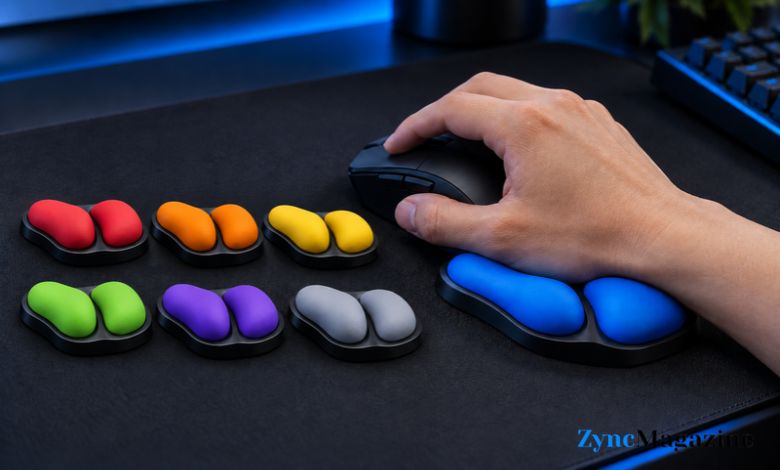
Long hours at a computer can leave your hand feeling tired, especially when you use a mouse for much of the day. A soft wrist pad may help you find a resting place, but it stays still while your hand moves. The BadSeed Tech Carpio is different. It sits beneath your palm and glides across your desk as you move your mouse.
This special edition uses DeltaHub’s Carpio 2.0 design and adds blue BadSeed Tech pads. But a good-looking desk accessory still needs to feel right in daily use. Here is how the Carpio works, what comes with it, and what you should check before choosing a size.
What Is the BadSeed Tech Carpio?
The BadSeed Tech Carpio is a small, movable support for your mouse hand. Instead of placing your wrist on a long pad, you rest the lower part of your palm on two silicone pads. The base then moves with your hand across the desk.
The BadSeed Tech edition comes with a black Carpio 2.0 and its standard pads. It also includes a set of replaceable blue pads made for this edition. You can choose a version for your left hand, right hand, or both hands. Small and large sizes are available.
How Does It Work?
Small PTFE feet beneath the Carpio help it glide. When you move your mouse, your hand guides the support along the desk mat or work surface. You do not have to stop and move a fixed pad each time your hand travels beyond it.
The design supports parts of your palm while leaving your hand free to move. You only need to rest your hand on the pads. Pressing down hard can make the Carpio harder to move and may cause your hand to feel tense. Think of it as something that follows your movement, rather than something you need to grip or push.
What Makes It Different From a Normal Wrist Pad?
A standard wrist pad gives you one broad place to rest your hand. That can feel pleasant when your hand stays in one spot. During larger mouse movements, though, your hand may slide away from the pad or rub against it. The Carpio travels with your hand, so its support stays in roughly the same place beneath your palm.
The difference is easy to understand, but it will not feel the same to everyone. Some people like the steady feel of a fixed pad. Others prefer the freedom of a moving support. Your mouse grip, desk space, and usual range of movement all affect which style feels more natural.
Read Also: Inurl:Spatial: A Simple Guide to Finding GIS and Spatial Resources
BadSeed Tech Design and Materials
The special edition has a black base and BadSeed Tech blue pads. The colour gives it a clear identity without changing the basic Carpio 2.0 shape. If you enjoy building a matching desk setup, the blue detail may be part of its appeal. The pads are replaceable, so the look is not permanent.
The Carpio 2.0 is made with an ABS plastic base, soft silicone pads, and PTFE feet. Each part has a simple job: the base holds its shape, the pads touch your palm, and the feet help it slide. The whole item is compact, making it easier to move between desks than a long wrist rest.
How to Choose the Right Size
The BadSeed Tech Carpio comes in small and large. DeltaHub lists the small version at about 8.4 × 3.6 cm and the large version at about 9.6 × 4.0 cm. These measurements give you an idea of the product’s size, but they do not tell the whole story of how it will fit your hand.
Check the maker’s size guide before ordering. If your hand falls between sizes, consider what you do most often. A smaller support may feel easier to control during precise mouse movements. A larger one may offer more room beneath your palm during general desk work. Also check that you have selected the correct hand. The left and right versions are shaped for different hands.
Setting It Up for the First Time
Place the Carpio beside your keyboard where you normally use your mouse. Rest the lower part of your palm on the silicone pads, then take hold of your mouse as usual. Move your hand slowly at first and let the support follow. You should not need to hold it down or think about it with every movement.
Give yourself a little time to adjust. A moving support can feel strange if you have used a fixed pad for years. Try a few ordinary tasks, such as browsing a page or moving between windows. Notice whether your hand feels relaxed and whether the Carpio stays beneath your palm. If it slips out of place or makes you twist your hand, change its starting position and check whether you chose the right size.
Does Your Desk Surface Matter?
Yes. The Carpio needs a surface that lets its feet glide. DeltaHub suggests using it on a neoprene or felt desk mat. You also need enough clear space for both your mouse and the Carpio to travel. A crowded corner of a desk may make the support bump into nearby objects.
Try moving your mouse and the Carpio together across your usual working area. They should feel reasonably easy to control. If one moves freely while the other drags, the setup may feel awkward. Check the mat and clear some space before deciding that the Carpio itself is uncomfortable.
Can You Use It for Gaming?
You can use the BadSeed Tech Carpio while gaming, but your style of play matters. Someone who makes smooth, controlled movements may find it easy to keep the support beneath their palm. Someone who often lifts the mouse or makes fast, wide movements may need time to see whether it suits them.
The BadSeed Tech edition uses the Carpio 2.0 design. DeltaHub also makes a separate G2.0 model with a strap that can keep the support with your hand during stronger movements. If a strap is important to you, check which model you are choosing. The BadSeed Tech look alone does not mean the product has the G2.0 strap.
Check Your Mouse Height Too
A wrist support should meet your hand at a comfortable height. Some vertical and ergonomic mice sit much taller than a standard mouse. With one of these, the Carpio may feel too low beneath your palm. The same height issue can arise if you plan to use it near a tall mechanical keyboard.
Look at your hand while it rests on your mouse. If adding the Carpio makes you bend your wrist into an uncomfortable position to reach the buttons, the heights may not work well together. DeltaHub offers accessories that can raise the Carpio for certain setups, but checking your mouse height first will help you make a better choice.
Who Might Like the BadSeed Tech Carpio?
The Carpio may interest you if a fixed wrist pad gets in your way, you want support that follows your mouse hand, or you prefer a compact item on your desk. The BadSeed Tech edition adds a bold blue detail for people who care about the look of their setup.
It may be a less comfortable fit if your desk has very little mouse space, your mouse sits high above your hand support, or you prefer to rest your whole forearm on a large pad. Comfort is personal, so pay attention to how your own hand feels. A desk accessory should make ordinary movements feel easier, not force you into a new grip.
Conclusion
The BadSeed Tech Carpio gives the familiar wrist rest a moving design. Its silicone pads sit beneath your palm, while the feet let it glide with your mouse hand. This edition adds replaceable blue BadSeed Tech pads to a black Carpio 2.0.
Before buying, check the hand option, size, mouse height, and space on your desk. Those practical details will have the biggest effect on how it feels each day. If you have lasting wrist pain, numbness, or weakness, speak with a qualified health professional rather than relying on a wrist rest to fix the problem.
(FAQs)
Is the BadSeed Tech Carpio the same as Carpio 2.0?
It uses the Carpio 2.0 design. The BadSeed Tech edition includes special replaceable blue pads as well as the standard pads supplied with the black Carpio.
Does the BadSeed Tech Carpio attach to your hand?
No. You rest your palm on it and guide it as you move. The separate Carpio G2.0 model has a strap for people who want that feature.
Should I choose the small or large size?
Start with DeltaHub’s size guide. If you fall between sizes, think about whether you want a smaller support for precise movement or a larger area beneath your palm.
Will it work with a vertical mouse?
It may, but some vertical mice are tall enough to leave the Carpio too low beneath your hand. Check your hand position and mouse height before choosing it.
Can the BadSeed Tech Carpio cure wrist pain?
No. It changes how your palm is supported while using a mouse, but it is not a treatment for wrist pain. Seek medical advice if pain or numbness continues.